


Amazon Smart Biz Website Builder
Redesigning the Building Blocks of WYSIWYG Websites, transforming confusing templates into flexible tools.

Timeline
Feb - Apr 2025
Key Areas
UX Strategy · Research · User Problem Identification · UI Design · WYSIWYG
People Involved
2 Product Designers (Me)
1 Design Lead
1 QA
Help business owners build pages faster by turning fiddly section settings into simple, discoverable controls.
Small business owners want a website, not a degree in web design. The editor shipped with powerful options but they were buried, inconsistent, and intimidating.
I focused on two high-value template sections that owners touch first: the image-driven hero area and the product collection highlight. The idea was to make the most common choices obvious, the advanced controls accessible, and the preview faithful so users spend seconds configuring, not minutes fumbling.
+34%
Faster Website Building
+21%
Fewer Errors while Publishing Websites
Hover over a chapter and give it a click — it’ll politely escort you like a very enthusiastic tour guide.
Next Case Study
Ruba Sales Manager App - Lead Management System
Need for a Redesign
Amazon SmartBiz Editor lets small businesses build websites without code. But two key sections in a fast fashion template, Image & Text and Top Picks (Collection Highlights) were frustrating to use. Business owners either stuck to the default layout or left the blocks empty.
I redesigned both sections to feel intuitive, flexible and (dare I say) enjoyable to use.

Amazon Smart Biz Website Creation Flow (For Small Business Owners)
Sign Up on Amazon
Smart Biz
Enter Buisness Details
(Name, Location, Industry)
Choose a Template or Start from Scratch
Customise Website Layout (Drag and Drop sections, Edit Styles)
Add Products (Image, Titles, Descriptions, Prices)
Connect Products to Collections
This is where i redesigned the template’s editable sections
Set up Payment methods (Eg. - Razorpay, Amazon Pay etc.)
Connect a custom domain and Publish website
Background – Understanding the Issues Faced
Who are the Users?
Non-technical small business owners using Amazon SmartBiz to build and manage their online stores.
Their goals -
🚩
Launch a website without coding
🚩
Showcase products professionally
🚩
Edit layout and content easily
🚩
Build trust and drive conversions
The Problem
😢
Rigid layouts: Users couldn't customise alignment, spacing, or mobile stacking.
😢
Buried controls: Important options were hidden or unlabelled.
😢
Confusion: Linking collections or making carousels work was... cryptic.
This leads to
This led to broken layouts, time wasted on hunting for settings and frustration or abandonment mid-edit.
We wanted to change that - to make a unified centralised Lead Management System.
🎯 Objectives
Give Owners Real Control, Without Overwhelming
Make key settings visible and intuitive.
Let users adjust layouts without code.
Let each brand feel custom-built, not template-stamped.
Process
01
Discovery
Analysed user behaviour and support tickets to uncover where non-designers struggled with layout, spacing, and preview mismatch.
02
Define
Converted user pain points into clear requirements for editable controls, mobile parity, and predictable layout behavior.
03
Sketch Lo-fi Wireframes
Explored quick wireframes to test grouping of controls, simplifying options, and reducing decision fatigue.
04
Prototype
Built high-fidelity, realistic editor flows to validate control behaviour, desktop/mobile previews, and feature discoverability.
05
Test and Stg based Testing
Ran usability sessions to measure task time, confusion points, and how confidently users could configure both sections.
06
Iterate and Handoff
Delivered specs, supported development, and refined interactions based on QA findings and early pilot feedback.
Research Insights
Demographics
Support Tickets by Topic
25%
20%
15%
10%
5%
0%

Image Layout

Text Styling

Mobile Issues

Linking Collections
Most support tickets centered on layout confusion, mobile responsiveness, and linking collections.
70%
30%
Only 30% of users customised their blocks
70% stuck with defaults—signalling usability barriers.
What we learnt :
Users spent >1 min looking for basic controls.
Confused why product blocks didn’t auto-link.
Wanted a "preview-as-you-edit" feel.
1- Image and Text Section
Problems
Owners couldn’t predict how images and text would behave across breakpoints; padding and overlap controls were hidden and inconsistent.
Solutions
Make the section configurable in one panel, with instant preview and simple defaults.
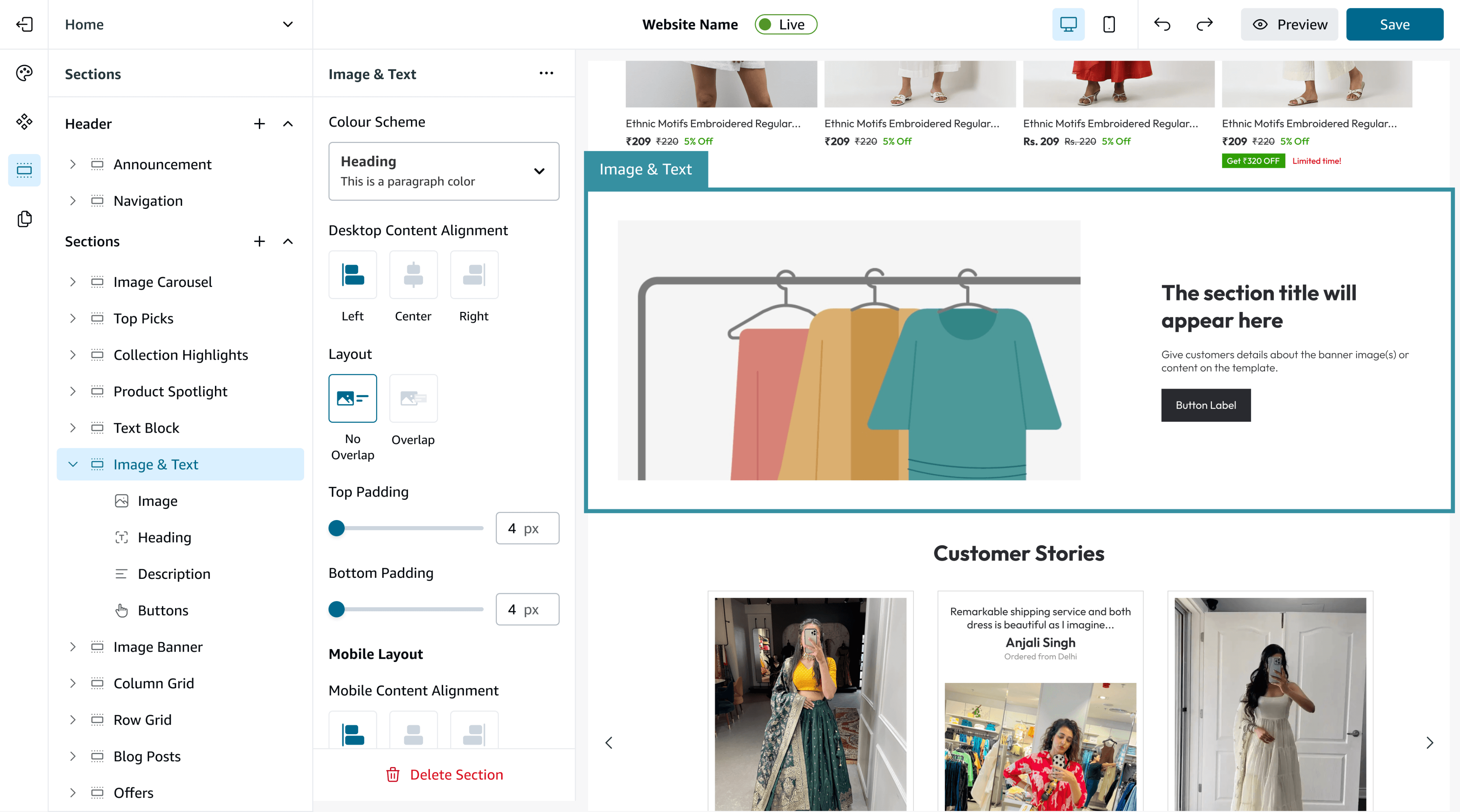
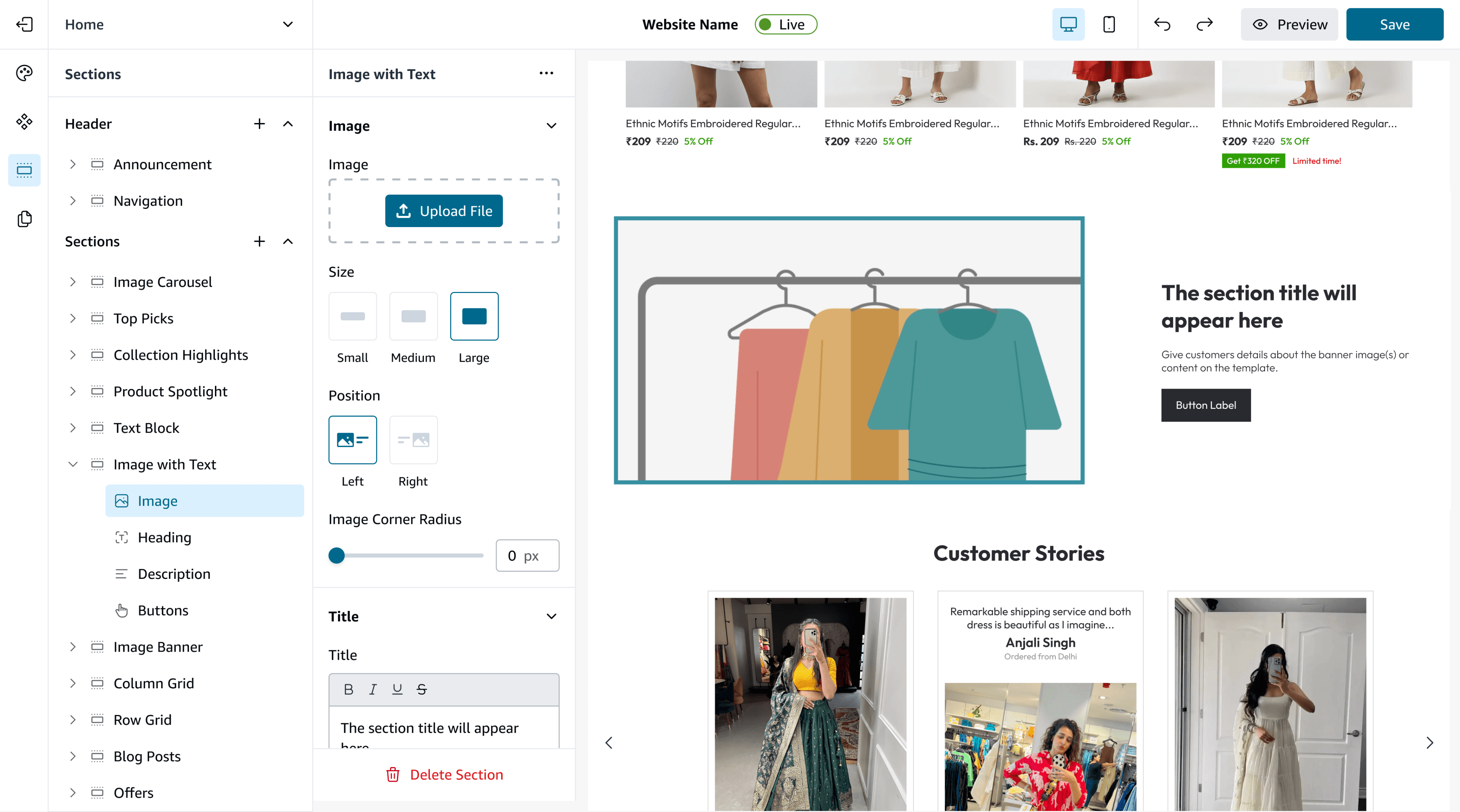
Here’s what a live site looks like with this block customised.
Desktop Content Customisation
Heading
This is a paragraph color
Heading
This is a paragraph color
Heading
This is a paragraph color
Heading
This is a paragraph color
Introduced clear preset themes + custom HEX to help users style sections quickly without guessing.
Desktop Content Alignment
Left
Center
Right
Added intuitive left/center/right alignment controls with live preview to remove layout guesswork.
Layout
No
Overlap
Overlap
Overlap on/off” toggle delivers the layered visual safely, without manual hacks.
Top Padding
4 px
Bottom Padding
4 px
Introduced Small/Medium/Large presets for predictable spacing and cleaner layouts.
Image Customisations
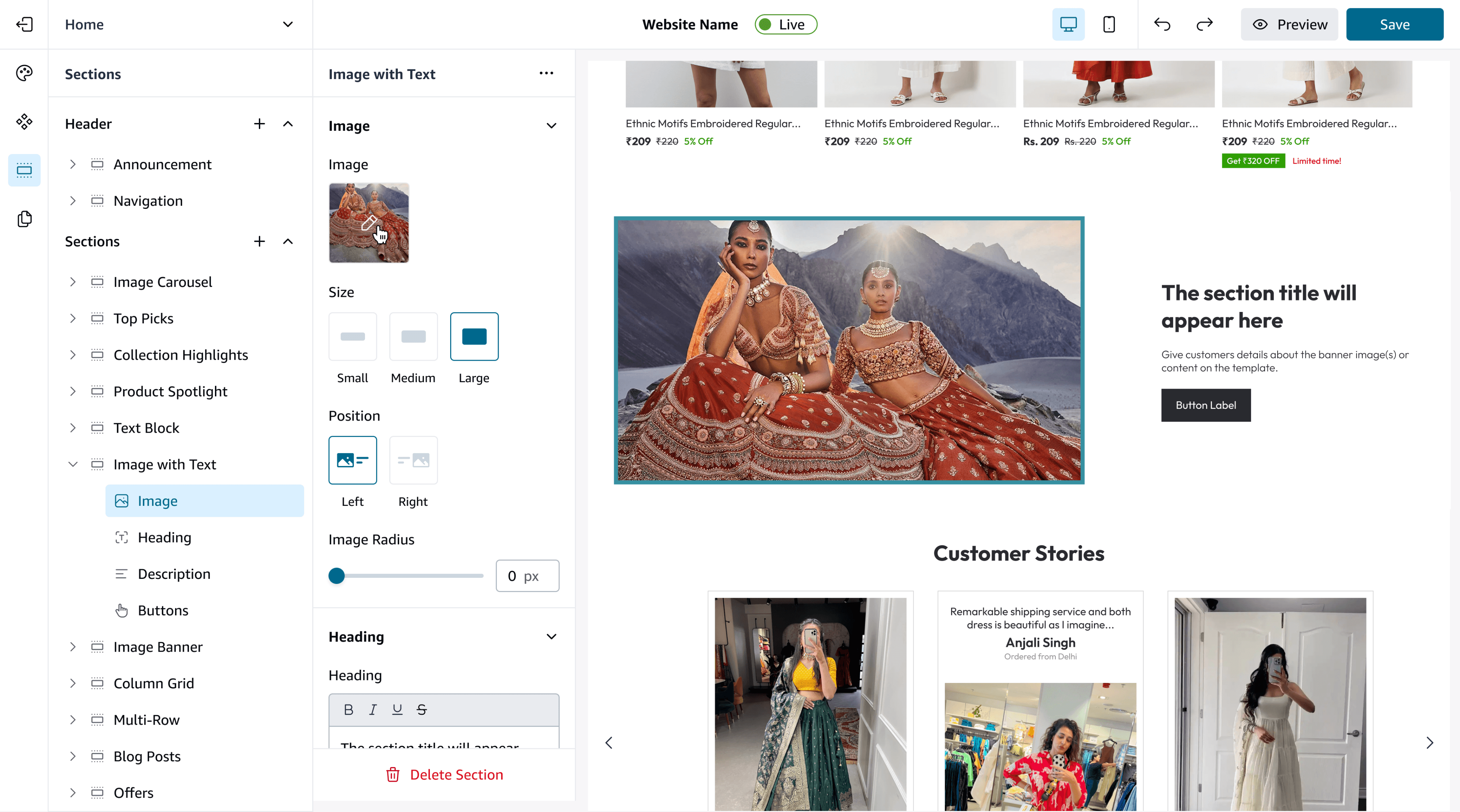
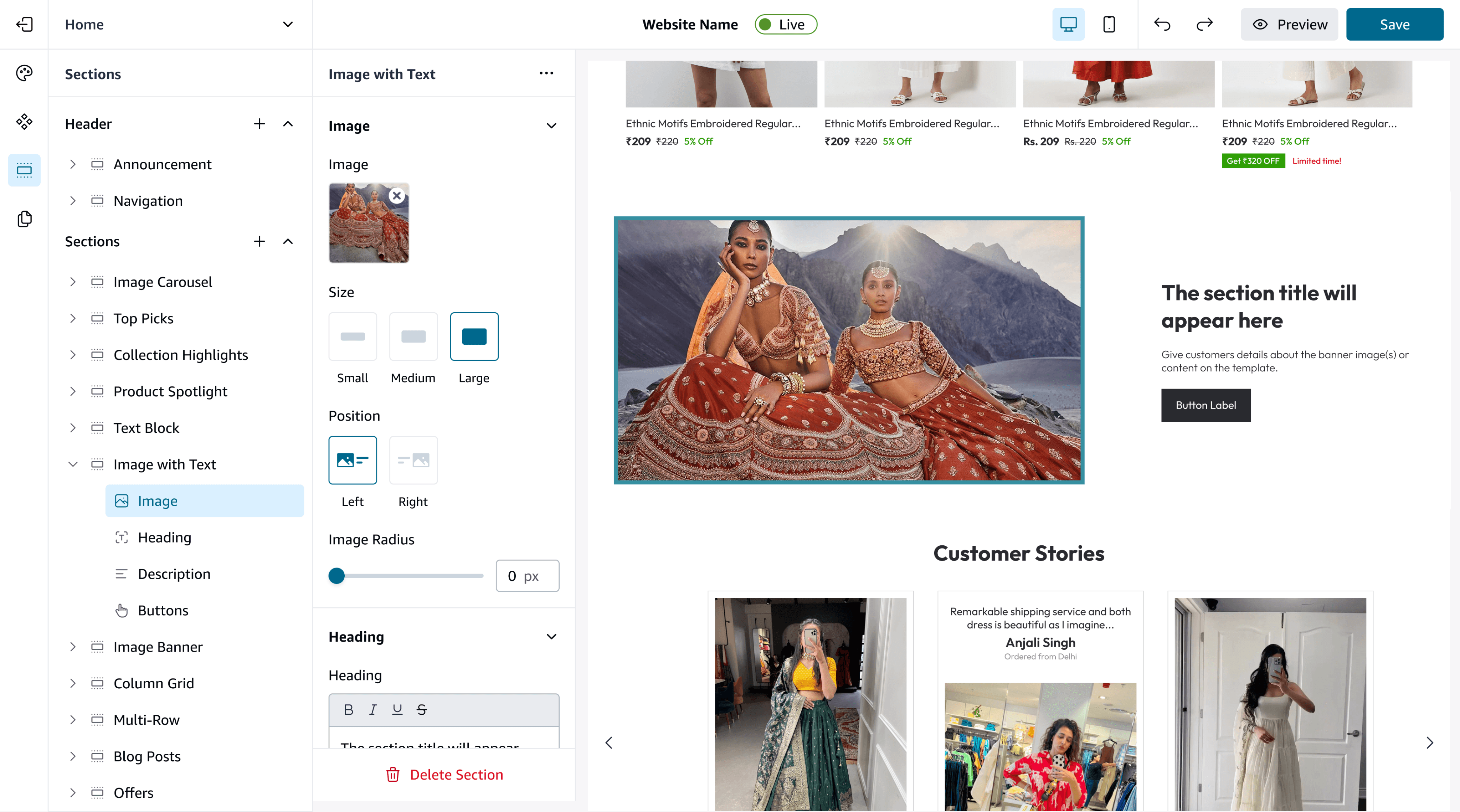
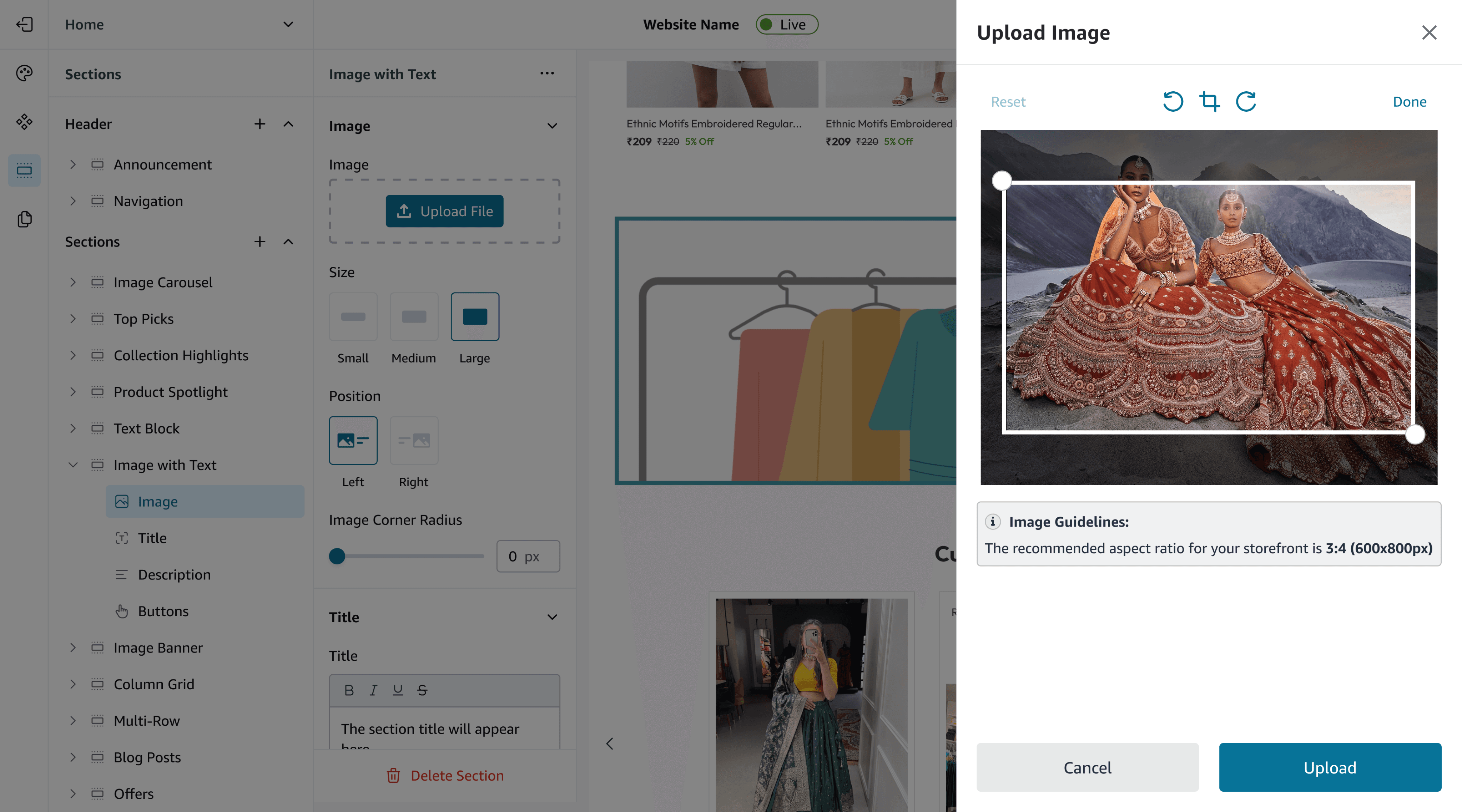
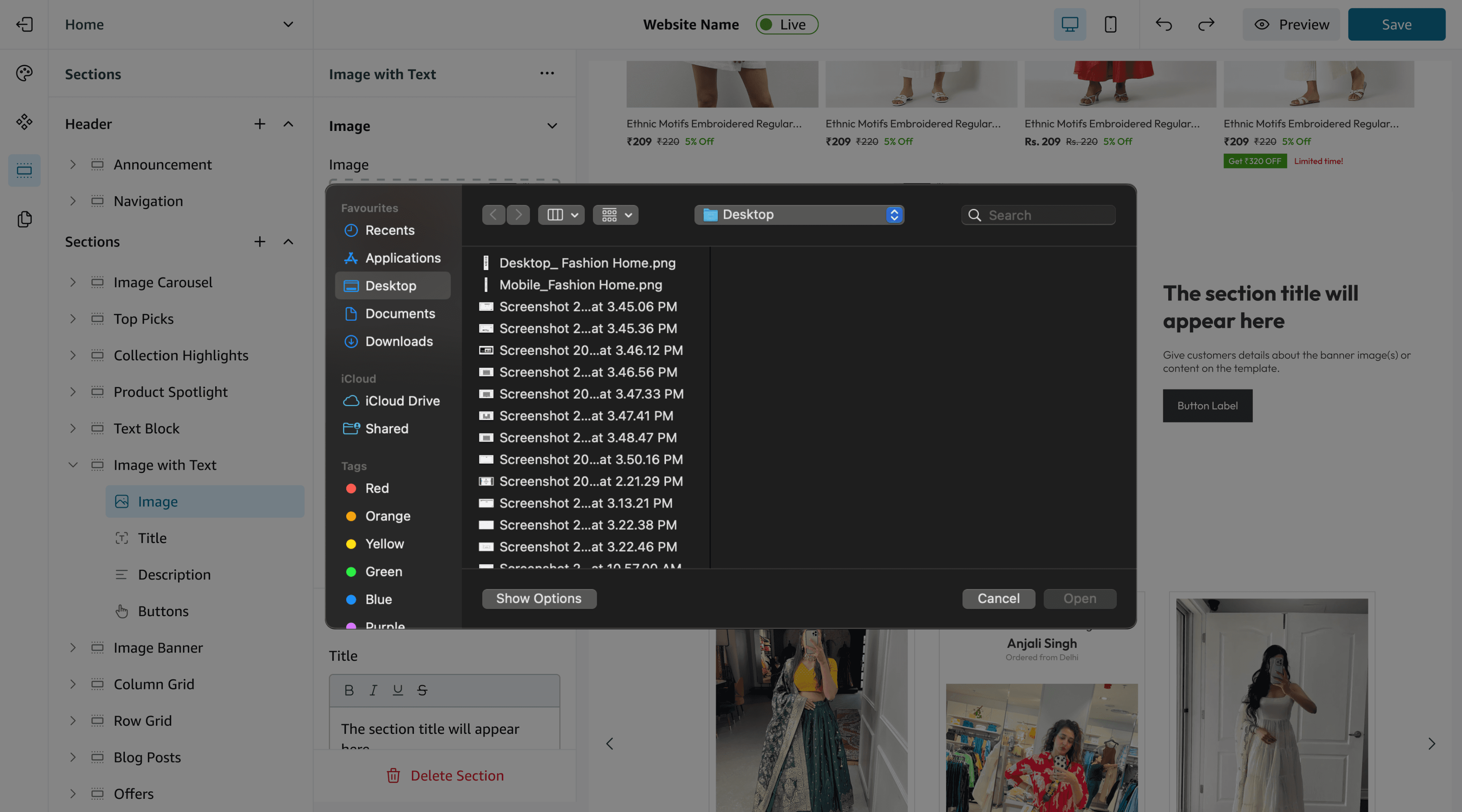
Image
Upload File
Added a dedicated upload area with “replace” behaviour and drag-and-drop support.
Size
Small
Medium
Large
Predefined size presets create consistent visual rhythm without requiring manual resizing.
Position
Left
Right
One-click position swap flips layout instantly while preserving content.
Button Type Modifications
Size
Small
Medium
Large
Type
Filled
Outline
Label
Button Label
Link
Paste a link or search
Button presets (sizes + filled/outline/link) standardise CTAs, while label + link fields ensure functional, usable actions.
Design Decisions
Single section panel groups all controls with clear desktop/mobile toggles.
Presets (Small/Med/Large) reduce dependence on pixel inputs.
Overlap toggle replaces confusing manual negative margins — safer and obvious.
Real-time preview reflects desktop & mobile instantly.
+34%
Faster Website Building
+21%
Fewer Errors while Publishing Websites
2 - Collection Highlights (Top Picks) Section
Problems
Adding a “top picks” product area required multiple screens. Owners misconfigured columns and mobile behaviour.
Solutions
Old flow to attach a collection
Open Template Editor (Scroll to “Top Picks” Section)
Navigate to Content Tab (Click on “Attach COllection”)
New Screen Opens (Select Collection)
Adjust section padding along with text and description edits and confirm changes
Open mobile settings (nested) to enable carousel
Go to Layout Tab to Select No. of Columns and products (Different screen)
Problems in the Old Flow -
Settings lived across 4–5 separate tabs.
Multiple screens caused context switching.
Users forgot steps (especially mobile carousel).
Many users abandoned mid-way because the flow felt “technical”.
Redesigned Flow to attach a collection along with screens
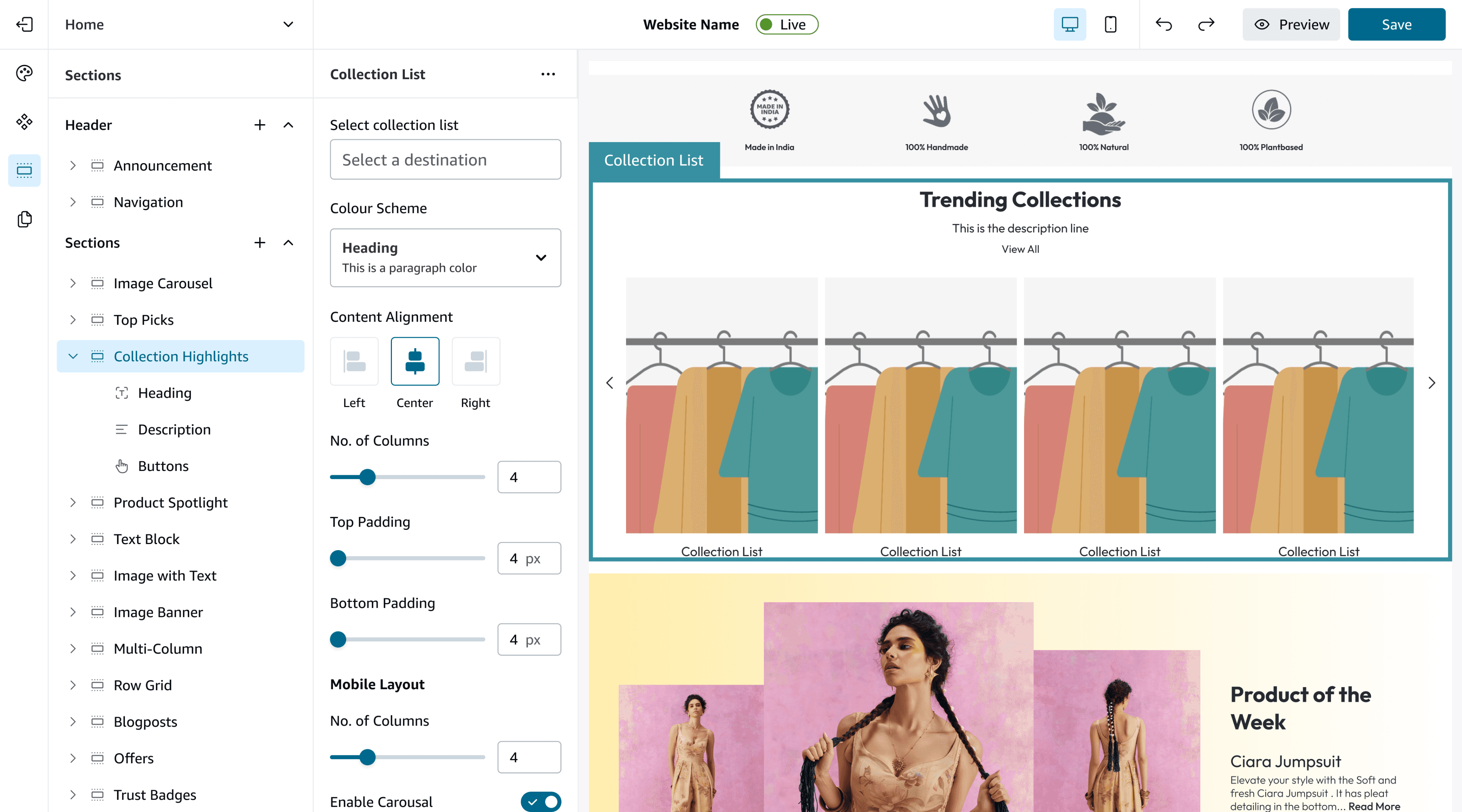
Open collection dropdown
Open the dropdown to browse all available groups/collections pulled from your existing pages.
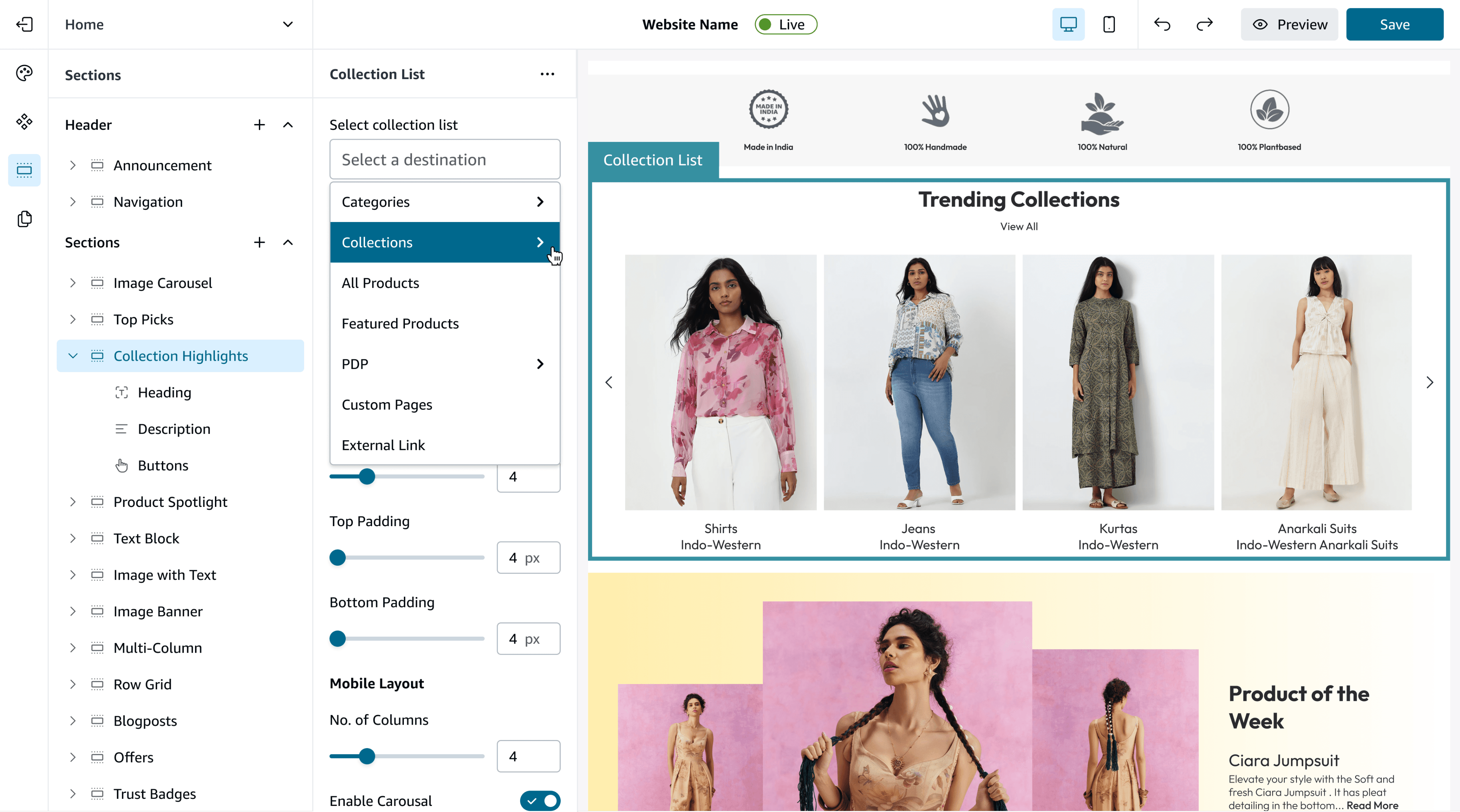
Filter by category
Pick a category from the same dropdown to quickly narrow down the collections relevant to this section.
Choose a collection group
Select the specific grouped collection you want to showcase in the Top Picks section.
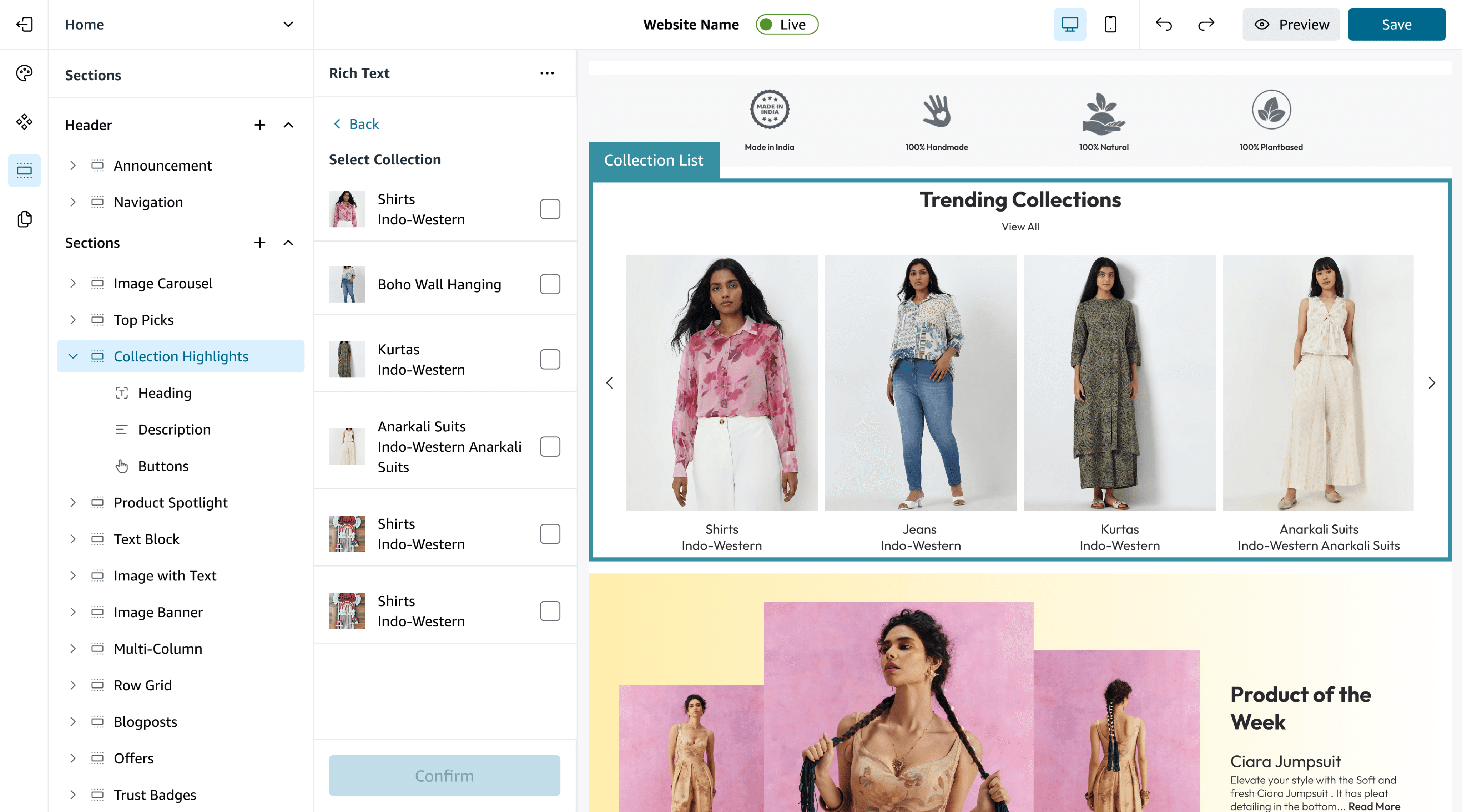
Select items & preview layout
Choose one or multiple items from that group — the layout preview updates automatically based on how many you select. Click Confirm to apply.
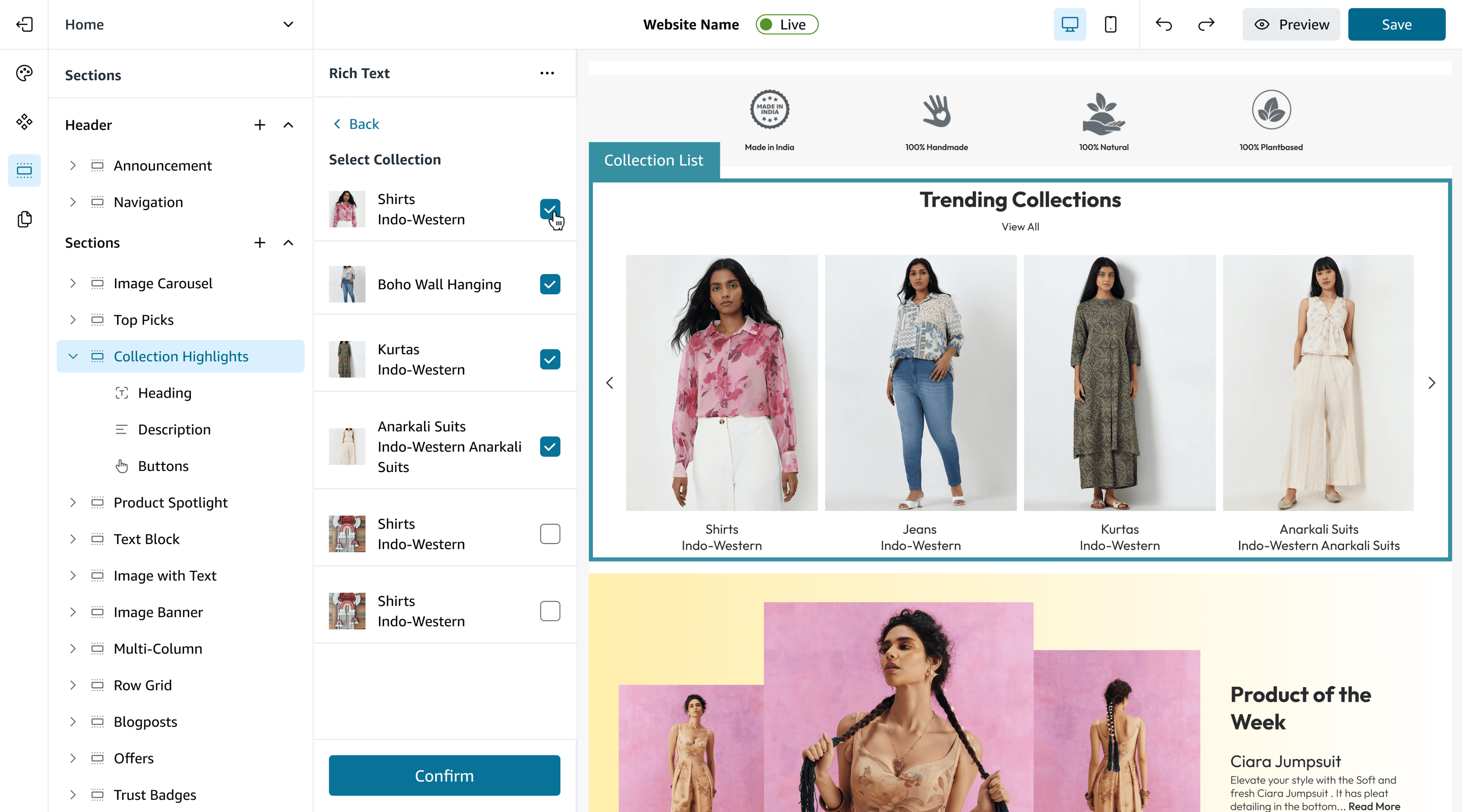
Edit or replace anytime
Once attached, the collection appears in your section. Hover over it again to edit, swap, or remove the collection whenever needed.
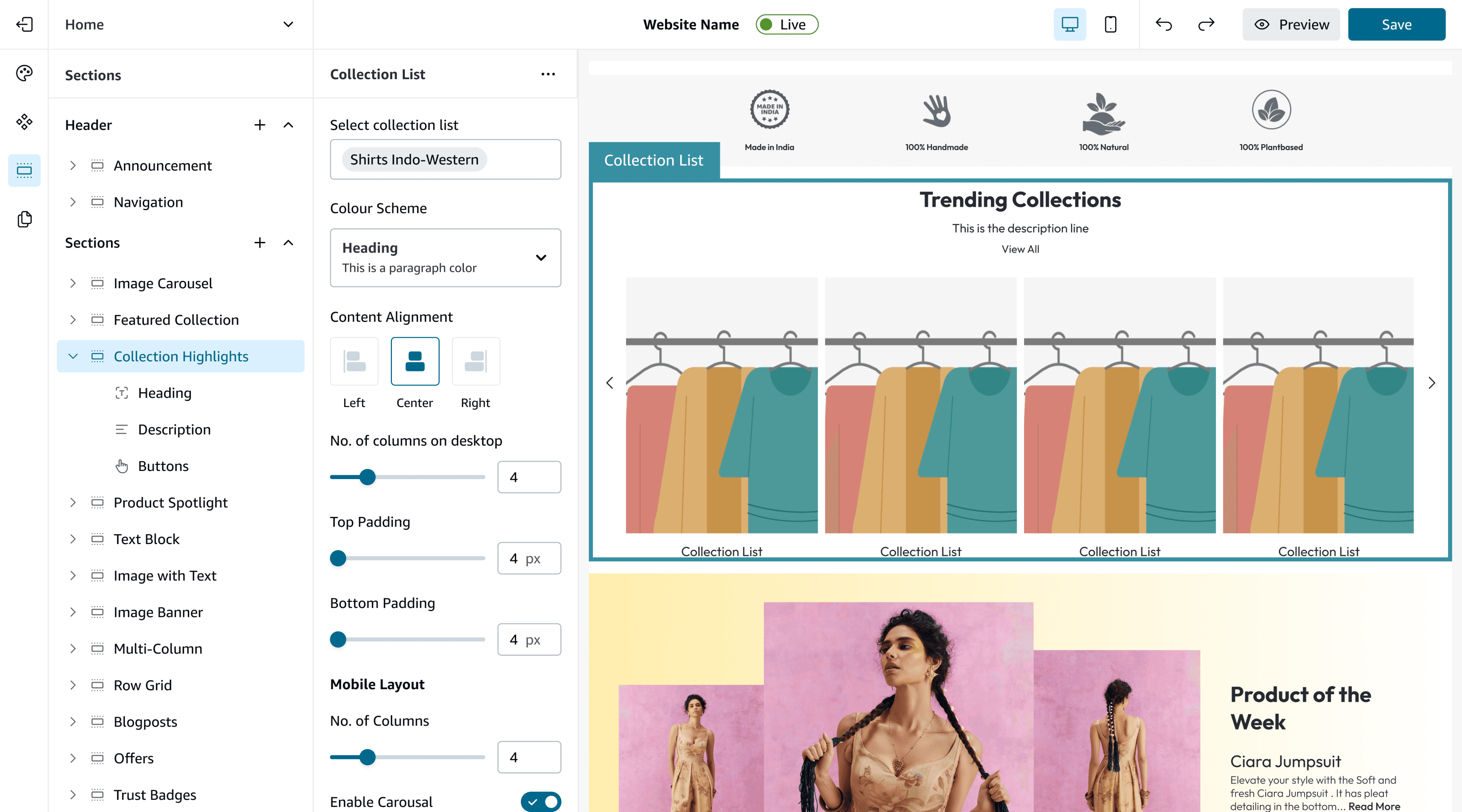
Section Customisations
Manage alignment, spacing, header and description text, and button styling all within one unified, easy-to-use panel.
✅
Attach collection upfront: connecting data first reduces empty state confusion.
✅
Auto mobile rules: suggest enabling carousel when columns >2 (but allow override).
✅
Color scheme preview applies to both header and cards to avoid clash.
Final_for_sure_final_UI.fig
Major Learnings
🎮
Group by goal, not by property. Users want to accomplish an outcome (e.g., “make hero look right”), so controls must be organized by task.
🎁
Presets beat precision for beginners. Small/Med/Large + sensible defaults reduce errors and speed up decisions.
😃
Preview parity is sacred. If desktop ≠ mobile preview, users distrust the editor — show both.
DESIGNED WITH
BY SYANDAN ROY



cyanroy.designs@gmail.com